Pages

Payoneer - How to use the Refer a Friend program


The Payoneer Refer A Friend  program is a great way to earn extra cash simply by telling your friends about Payoneer. Today, we’re excited to let you know that the Refer A Friend program has been upgraded! You can now access your Refer A Friend details directly from My Account. In addition, you will have a personalized dashboard with the ability to share, monitor and track your referrals…all in one place!
Read the step-by-step instructions to learn how to earn rewards by sharing Payoneer with your friends:

How to Access My Refer A Friend Details

1. Log in to your Payoneer account.
2. From the main menu, click Activity and then Refer A Friend.
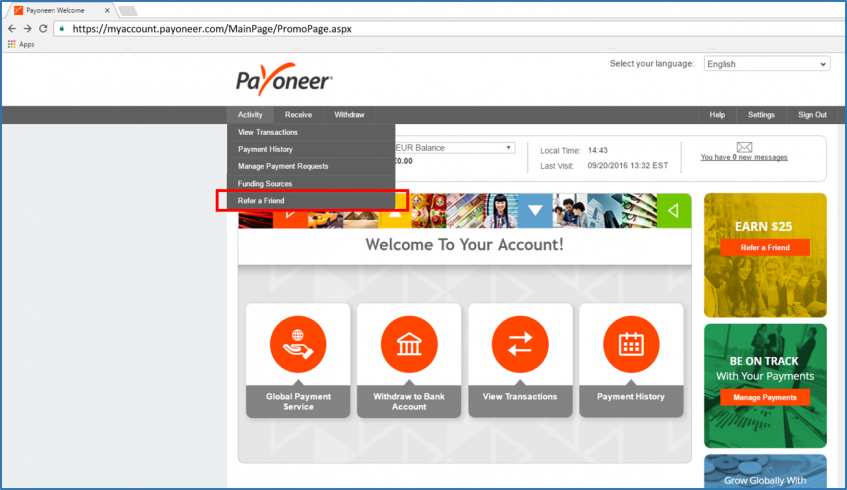
myaccount-raf-menu
3. The Refer A Friend page will be displayed. At the top of the page 2 figures will be presented:
  • The number of your friends that have signed up to Payoneer through your referral
  • The amount of money that you have earned through the Refer A Friend program until today
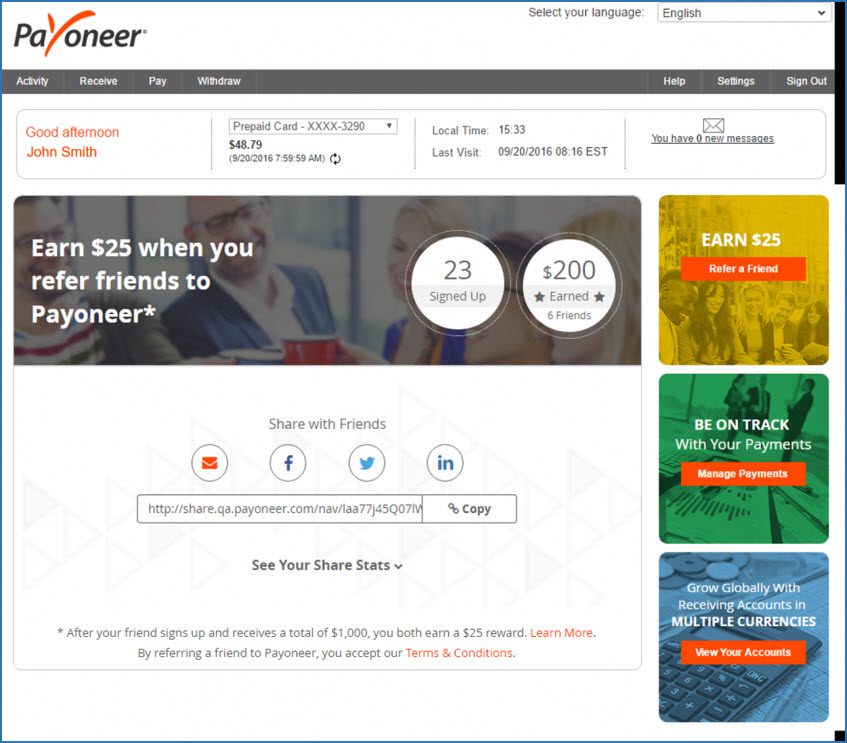
*Note that these figures will only be displayed if at least one friend has signed up to Payoneer via your referral.

How to Share My Referral Link

Your referral link (URL) is displayed below the share icons. You can copy and paste this link into a website, blog post, landing page, etc. or you can share your link via email or directly to your Facebook, Twitter and LinkedIn feed.
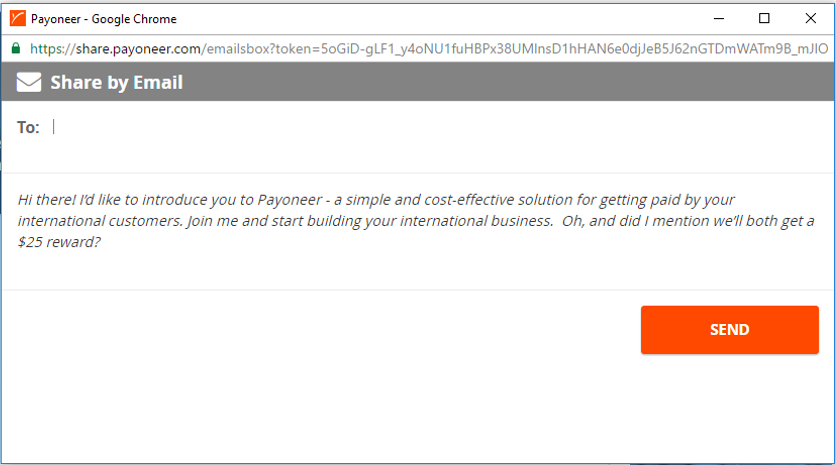
Email – To share your referral link with your email contacts:
  1. Click the email icon
  2. Add the email addresses you would like to include
  3. Use the existing message we’ve created or write your own personalized message
  4. Click Send
myaccount-raf-email
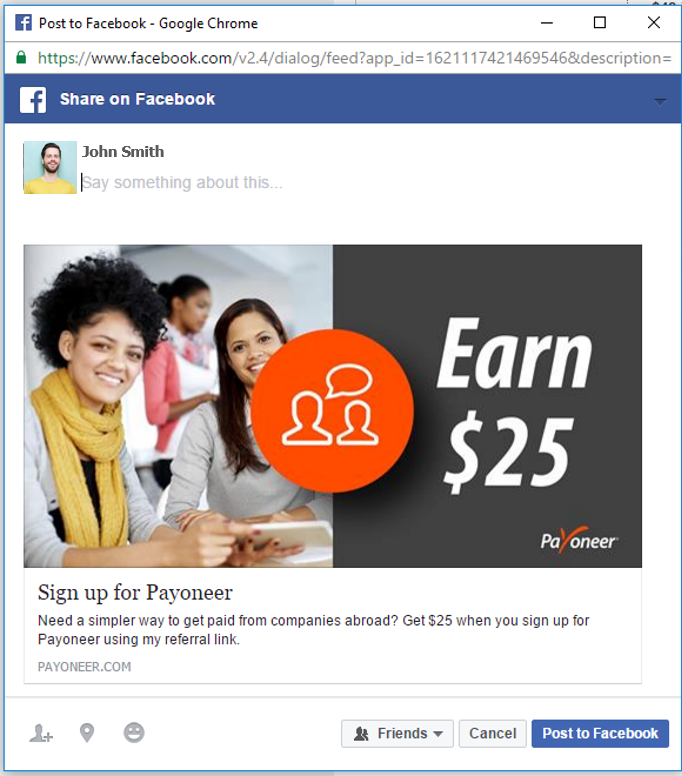
Facebook  To post your referral link on your Facebook page
  1. Click the Facebook icon
  2. If you are not signed in to Facebook, you will be prompted to sign in to your account
  3. Add a personal message to tell your friends why they should click the link
  4. Click Share
myaccount-raf-facebook
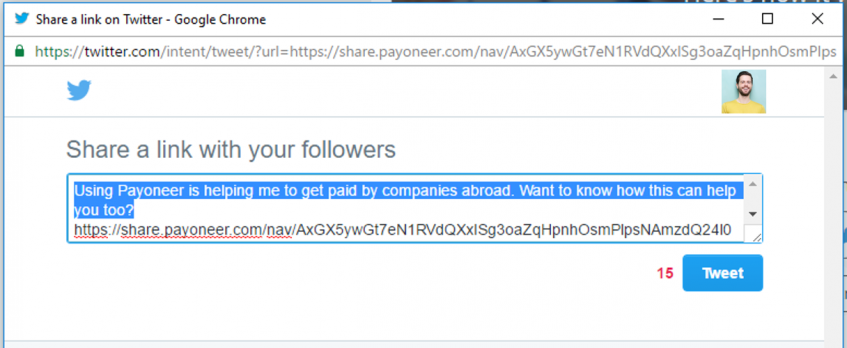
Twitter – To tweet your referral link
  1. Click the Twitter icon
  2. If you are not signed in to Twitter, you will be prompted to sign in to your account
  3. Use the existing message we’ve created or write your own personalized message
  4. Click Tweet
myaccount-raf-twitter
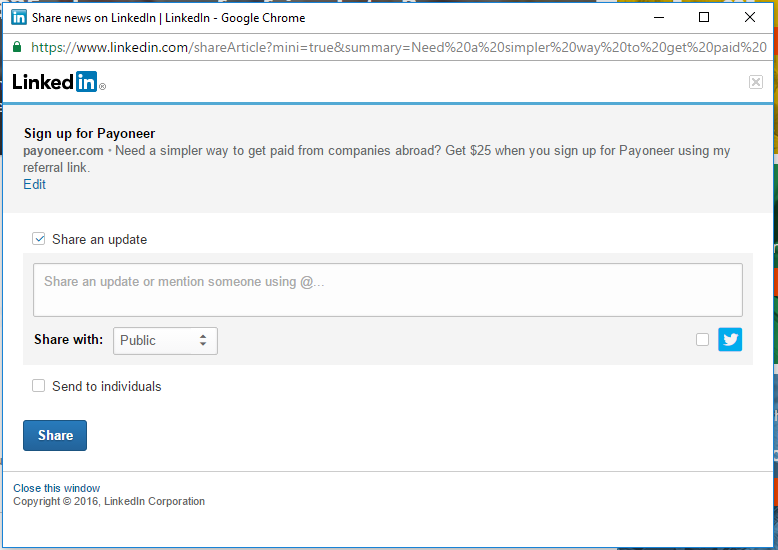
LinkedIn – To post your referral link on your LinkedIn profile
  1. Click the LinkedIn icon
  2. If you are not signed in to LinkedIn, you will be prompted to sign in to your account
  3. Add a personal message under the check box which says Share an update
  4. Select whether this link should be showcased to the public or only people who you are connected to
  5. Select whether you want to post this link to only individuals, or automatically share with all of your LinkedIn groups as well by clicking the corresponding box.
  6. Click Share
myaccount-raf-linkedin

How to Track Your Referral Links

You can now monitor your referral stats and track sent emails from directly inside My Account. To view statistics regarding your Refer A Friend activity, click See Your Share Stats.
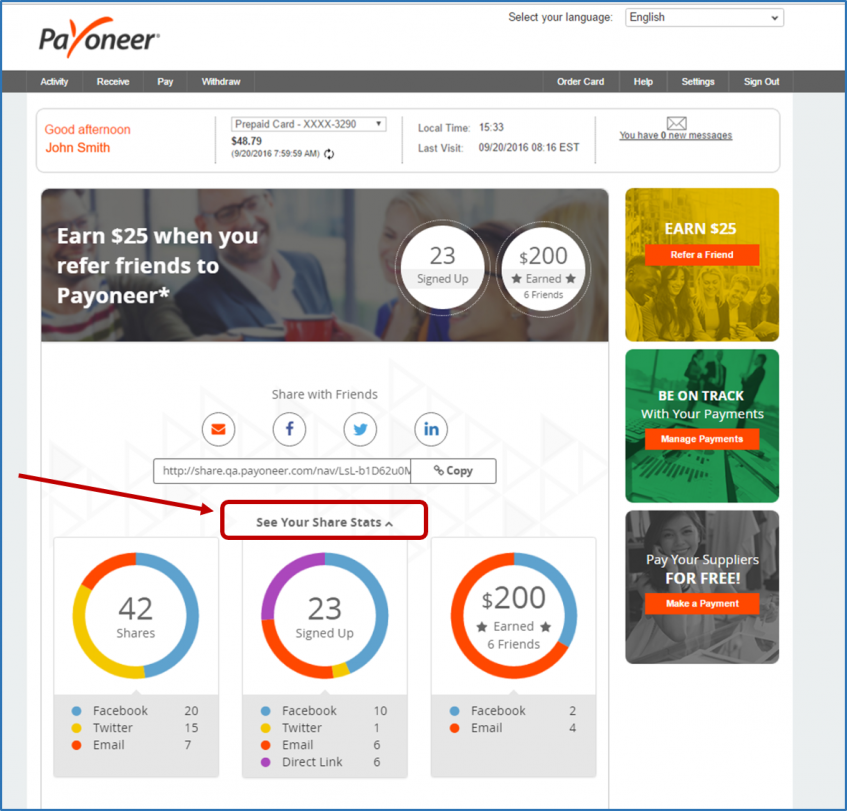
myaccount-raf-share-stats
1. Shares – this is the total number of referrals that you have shared via all available methods. Below the circle is a breakdown of the total number, categorized according to referral method.
2. Signed Up – this is the number of friends that have signed up to Payoneer using your referral link. Below the circle is a breakdown of the total number, categorized according to referral method.
3. Earned – this is the amount of money that you have earned, to date, in the Refer A Friend program. The total amount appears together with the number of friends that have also received rewards. Below the circle is a breakdown of the total amount, categorized according to the referral method by which your friend signed up to Payoneer.
Why don’t I see my referral stats?
If you have been an active user in the previous Refer A Friend program, your accumulated stats will automatically be exported to the new application; however, they will not be categorized according to referral method. These figures will instead be categorized as Till Dec. 2015.

How to Use the ‘Sent Emails’ List
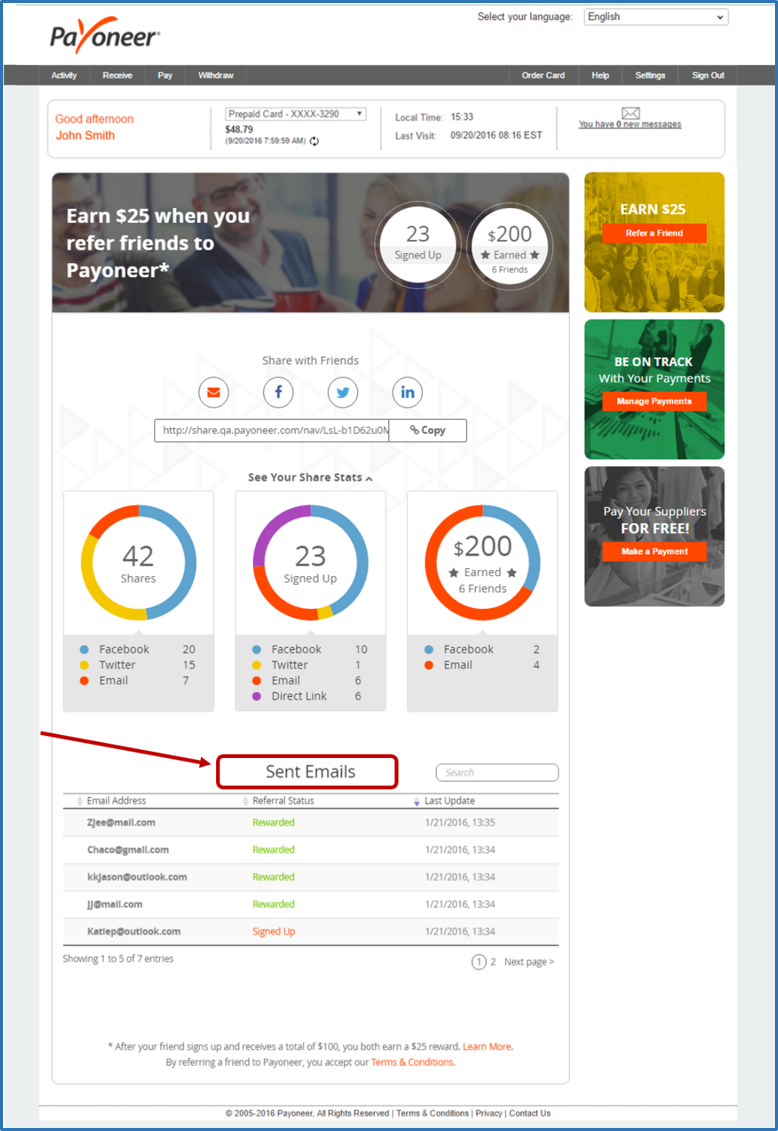
myaccount-raf-email-stats
If you scroll down, you’ll see your email stats, titled Sent Emails. This list includes the following details:
1. Email addresses – this is the email address of the friends who received your referral link.
2. Referral Status – this is the current status of the referral.
  • Shared – you have sent a referral link to your friend
  • Signed Up – your friend has signed up to Payoneer
  • Rewarded – your friend has earned at least $1,000. Both you and your friend are rewarded $25.
3. Last Update – this is the date and time at which the referral status was updated.
For convenient viewing of the list:
  • Use the triangles by the column heading to sort in ascending or descending order.
  • Use the search box to locate a specific email address.
  • Scroll through the list by clicking Next at the bottom right of the list.
You now have all the tools and information you need to start referring your friends to Payoneer and receive rewards. To view your personal referral link, log in to Payoneer!

Ready to Refer a Friend Click HERE: http://bit.ly/2yErCVD
 Happy Reading!

Oinsa Buka Osan liu husi Utiliza Internet


 Atu buka osan liu husi dalan asesu internet laos difisil maibe laos mos fasil signifika katak atu hetan osan husi internet preciza mos servisu maka'as, badinas, komitmentu no paciencia.
Diak, agora hau sei hatudu espasu hirak maka ita sei uza atu atinji objektivu hodi buka osan liu husi dalan asesu deit internet.

1. Hetan osan liu husi dalan PTC (Paid To Click)
PTC ou paid to click hanesan maneira fasil atu hetan osan gratuita husi internet, iha nebe ita sei hetan osan liu husi dalan Click Iklan ou banner nebe iha website nebe ita vizita. Dala ruma ema barak la imajina oinsa bele click deit hetan ona osan mesmu osan nebe hetan kiik maibe se karik ita badinas maka osan ne'e sei sai barak.
Importante!! maka ita labele tuir PTC barak maibe buka atu konsentra iha PTC ida ou rua deit.
Agora dadaun hau koko hela PTC ida ho naran PTC Clixsense, PTC ida ne'e hari'i no fundasaun metin ona hahu husi tinan 2007 no iha provas katak ema barak ona maka regista iha PTC ne'e.
Husi artigu balun nebe hau le'e PTC ida ne'e hanesan situs tuan iha mundo no valoriza membru nebe click banner ou iklan ida ho presu entre $0,001 - $0,02, no minimu selu kada membru ho registu standart sei selu $6 no ba sira nebe registu ho membru premium sei selu $8.
Nune'e mos atu hetan osan laos deit husi Click Iklan ou banner maibe bele mos hetan liu husi prenche formulariu survey ruma nebe oferece no bele manan mos jogus Clixgrid ho valor entre $0,5 - $5 loron-loron. 

Kuinece Blog Avansadu


Iha posting ida ne'e, hau fahe uituan informasaun kona ba Blog Avansadu karik maluk sira hatene ona ninia signifikadu bele ignora, maibe karik seidauk bele le'e kontinua.

A. Saida maka blog
Blog abreviasaun husi liafuan Weblog, termu nebe primeira vez uza husi Jorn Barger iha fulan Dezembru 1997. Utiliza termu Weblog atu temi grupo husi website privadu ne'ebe sempre atualiza no ligadu ba website seluk nebe sira senti furak no kapas akompanha ho komentariu-komentariu husi sira rasik. Maioria, Weblog bele akumula hanesan mini website privadu para ema ne'ebe kria bele hatudu oin-oin husi tipo web ho fasil hanesan resultadu pesquiza,  grupo link iha internet, dokumentus-dokumentus (file-file Word, PDF, nsst), fotografia nomos multimedia ou filmes.
B. Tipo Blog
Hanesan mos media iha jeralmente, informasaun ne'ebe posting iha blog foti topiku interesante atu tau iha blog. Iha tipu oin-oin husi blog tuir ninia konteudu ne'ebe mak iha hanesan: Blog politika, Blog privadu, Blog saude, Blog linguistika, Blog turista, Blog pesquiza, Blog direitu, Blog media, Blog edukasaun, Blog negocios no seluk-seluk tan.

Tips Seguro Wainhira Utiliza Internet


Sempre kuidadu no responsivu iha interaksaun online tomak.
- Proteje ita nia informasaun pesoal no identidade. Labele fahe identifikasaun no informasaun privadu. Hanoin saida mak ita fahe online ema seluk bele kopia no fahe iha situs publiku.

  1. Tenki krítiku ho buat ne’ebe mak ita lee no haree iha online. 
  2.  Aplika konfirasaun privada ba foto no imajen sira mak ita fahe liu husi Facebook; koñese ita nia kolega online sira; labele koalia ka hamaluk ho ema deskoñesidu iha rede sosial. 
  3. karik sira laos ida mak ita haree ne’e!
  4. Hatudu ita nia hahalok diak no respeita ema. 
  5. Karik ita atu hasoru belun ruma husi online, tenki ba ho ema boot ruma no hasoru malu iha fatin publiku. 
  6. Husu konsellu ba ema adultu, bainhira ita hasoru buat ruma ne’ebe laloos no konfuza ita. 

Hanoin ba katak: buat hotu ne’ebe lao online hela nafatin hanesan online!

Kuinece Domain no Hosting Website

1. Introdusaun
Konyesementu kona ba  domain no hosting. Website ida kompostu husi buat 3 maka hanesan:
Domain : naran / enderesu website
Hosting : fatin atu rai ou quarda file husi  website
Dezenu : Aparensia ou modelu website
Kuandu laiha buat 3 iha leten ne’e website sei labele asesu husi rede internet.
Hanesan ita kompara ho mundu realidade katak website ne’e hanesan uma ida. Domain maka enderesu husi uma ne’e no hosting maka rai no dezenu maka modelu husi uma ne’e rasik.

2. Domain
Domain hanesan naran uniku ne’ebe uza atu kuinece naran husi servidor.
Nomeasaun domain maneja husi  organizasaun ida naran Internet Corporation for Assigned Names and Numbers(ICANN).
Domain fahe  ba parte 3 maka hanesan:
Domain TLD (Top Level Domain) : katak  domain-domain ne’ebe  popular ou kuinecidu liu utiliza iha mundu hanesan .tl, .com, .org, .net, .info no extensaun sira seluk.
Second Level Domain : katak domain level 2 ezemplu maka hanesan  tosc.tl (tosc=second level domain, .com = top level domain). Iha Timor-Leste ita mos konyese domain hanesan .com.tl, .org.tl, .edu.tl, no extensaun sira seluk.
Lower Level Domain : bain-bain konyese hanesan subdomain. ezemplu demo.fdsl.tl, blog.likisahosting.net, nst.