Pages

Webspace, VPS and Dedicated Server explained: Differences and applications


Time and again we receive inquiries asking which product is best suited for your personal requirements. In the following we would like to give you an overview of our products and their applications:

Webspace Packages:

Let's start with our Webspace Packages, which are ideal for hosting smaller websites, blogs and forums. The intuitive and simple menu navigation of the cPanel web interface allows even inexperienced users to navigate relatively easily. The Webspace Packages are suitable both for beginners who want to create their first own website and for experienced users who want to create a professional website.
More than 300 different PHP applications such as WordPress, Joomla, Magento, MediaWiki or Bootstrap can be installed with the included 1-click installation tool. In addition, with the Contabo Website Builder we offer a possibility to create your own website without any previous knowledge required. You can choose from over 200 design templates that are already optimized for use on mobile devices and easy to customize.
Each webspace package also includes one or more domains free-of-charge, further can be added at any time. All websites are also equipped with a free SSL certificate.
How to Improve Your Online Reputation and Boost Your Bottom Line

Every business, no matter the industry, is going to have the occasional unhappy customer, and most customer complaints can be settled quickly and efficiently through a phone call or email. But the situation becomes increasingly complicated if the customer isn’t satisfied with your resolution and they leave negative feedback about your business online.
With one simple click, your reputation could take a huge hit. And your company’s reputation and bottom line go hand-in-hand. Customers have thousands of options when it comes to where they spend their money, and if they read a negative review, it’s easier to click away than it is to give you the benefit of the doubt.
The solution?
Establishing a reputation management strategy before a problem occurs allows you to effectively respond to complaints without having to worry about how they will impact your bottom line.

Creating a cPanel

Way to create a Cpanel
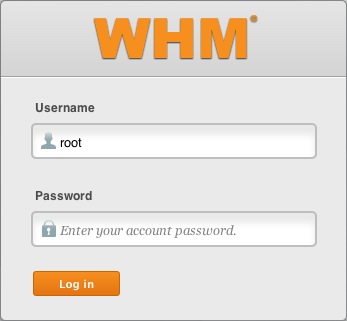
  1. Login to the WHM.
    WHM login
  2. Click Account Functions.
    Account Functions icon
  3. Click the icon Create a New Account.
    Create a New Account icon
  4. Under Domain Information enter the domain, username, password (twice) and the contact email address. 

Istoria Domain .TL


Country code Top Level Domain (sigla ccTLD) nudar estensaun (extension) ka letra hirak nebe kolokadu iha domain name nia kotuk.
Domain Name nee rasik nudar naran uniku iha mundu internet ho nian estensaun (letra iha kotuk) hodi reprezenta karater instituisaun dalaruma refleta mos paiz nia orijin.
Estensaun domain popular sira iha mundu internet mak hanesan .com ba komersial/kompania .net ba kompania IT & telekomunikasaun .org ba organizasaun no seluk tan. facebook.com google.com yahoo.com hanesan izemplu balun ba domain ho nian estensaun.
Ba Timor-Leste mak .tl (DOT TL) tuir rekezitu ISO 3166-1 Standart, nudar identidade Timor-Leste nian iha mundu internet. Estensaun domain ida ne'e mosu hafoin TL restaura nia independensia iha 20 Maiu 2002.
Iha periodu resistensia liu husi komponente resistensia no ativista soliedaridade internasional balun konsege hamosu estensaun domain .tp (dot tp) nudar akronimu ba Timor Portguese iha fulan Dezembru 1997, liu husi operador internet Connect.ie nebe ho nia baze iha Dublin, Irlandia, konteudu husi website sira ho domain .tp kuaze hotu-hotu ho materia publikasaun resistensia nian.
Liu tiha 20 Maiu 2002, TL nudar nasaun independente nebe hetan ona rekuinesimentu internasional, ho nune'e IANA (International Asign Number Authority) fo tan .tl ba TL, maibe ho estatu latutela ba ema ruma tamba estatutu .tp sei existe hela no tutela ba lider timorense Xanana Gusmao nudar kontaktu administrativu. Departamento IT hosi TL nian hato'o pedidu ba IANA iha loron 30 Augustu 2005 hodi halo alterasaun ba domain .tp hodi muda ba .tl.

Changing Name Servers of a Domain Name

  • To Modify Name Servers of your Domain Name
  •  STEP 1Log in to your control panel. Learn how
  •  STEP 2Navigate to the Order View.
  •  STEP 3Update the Name Servers.

In order to host a website on your domain name, you will need to obtain the Name Servers from the
Web Hosting company with whom you wish to host your website and point your domain name to these
Name Servers.

To Modify Name Servers of your Domain Name

Contact your Web Hosting Company and find out from them the Name Servers you need to use.
If you have purchased Web Hosting for your domain name through LikisaHost, then you need to set the 
Name Servers as specified by LikisaHost.
STEP 1:Log in to your control panel. Learn how
STEP 2:Navigate to the Order View.
Search the domain name for which you want to change the name servers and select the domain
 to view the order information.
NOTE
If the domain name is Locked/Suspended by LikisaHost, you will have to first unlock/unsuspend 
it before proceeding further.